AI is now baked into serious workflows. Surveys and case studies across 2024–2025 show developers writing code 30–50% faster with modern AI coding tools, especially when working across multiple stacks like PHP, Python, and JavaScript.
If you’re building:
- Plain
HTML/CSS/JS sites - Core
PHP apps - Laravel
APIs and backends - Python
(Django/Flask/FastAPI) apps - WordPress
or Joomla sites
…there are a few AI tools that should almost certainly be in your toolbox in 2026.
This article list the top 5 AI tools, how they fit into different stacks, and concrete ways to use them on real projects.
Top 5 AI Web Developers Tools
1. GitHub Copilot – Your in-IDE autopilot for all major stacks
What it is:
GitHub Copilot is an AI pair programmer built into your IDE (VS Code, JetBrains, Neovim, etc.). It suggests entire lines, functions, and even full files as you type. It supports JavaScript, Python, PHP and many more languages, and works well across common web stacks.
Best for:
- HTML/CSS/JS
frontends - Core
PHP scripts - Laravel
controllers, models, and routes - Python
backends (Django/Flask/FastAPI) - Node/Express
services that talk to your PHP/Python backends
How it helps in real web projects
- Core PHP website (no framework)
- You start typing a contact.php form handler with basic validation.
- Copilot auto-completes $_POST checks, sanitization, and PDO queries to insert into MySQL.
- It can also generate a minimal HTML form when you start writing <form action=”contact.php” …>.
- Laravel booking system
- You type a route definition in routes/web.php for /bookings.
- Copilot suggests the matching controller method stub (e.g. BookingController@index), and when you open the controller it proposes the Eloquent query, pagination, and a view call.
- Start writing a Booking model with relationships, and it often suggests hasMany/ belongsTo relations correctly based on names.
- WordPress/Joomla customization
- In a WordPress plugin, once you start writing add_action(‘wp_enqueue_scripts’…, Copilot will guess the typical pattern of enqueuing JS and CSS.
- For Joomla modules, once you write the first lines of a helper class or template, it completes boilerplate structure quickly.
Why it’s a top pick:
Copilot is fast, deeply integrated into editors, and supports all the languages you mentioned (PHP, Python, JS) plus the frameworks that sit on top of them.
The video provides an essential insight into using GitHub CoPilot with VS Code.
- Signing up for GitHub CoPilot account and plan
- Installing GitHub CoPilot in VS Code
- Auto generating a function to connect to a database in PHP.
ChatGPT + Codex – Architecture, Debugging & Multi-Stack Problem Solving
What it is:
ChatGPT (especially with the integrated Codex-style coding agent released in 2025) is a conversational assistant that can explain, write and refactor code across multiple languages and frameworks.
Unlike Copilot (which lives inside your editor), ChatGPT is brilliant for:
- High-level design decisions
- “Why is this breaking?” debugging
- Migrating between stacks (e.g. PHP → Python, jQuery → vanilla JS)
- Generating snippets for CMSes like WordPress/Joomla where docs are fragmented
Best for:
- Planning architecture for multi-stack apps (e.g. Laravel API + React frontend)
- Understanding legacy Core PHP or Joomla code
- Writing WordPress hooks & filters
- Refactoring or translating Python/JS/PHP code between versions or frameworks
Real-world examples
- Modernizing a legacy Core PHP app
- You paste a 300-line index.php with inline SQL and HTML.
- Ask: “Refactor this into MVC-style structure and show me how to move DB queries into a separate class.”
- ChatGPT proposes a folder structure (/app, /views, /config), splits out DB access, and suggests how you might gradually transition to Laravel.
- Debugging a Django + Vue.js app
- You paste your Django view and the corresponding API call in Vue.
- Ask: “Why is this API returning 403 only on POST and not on GET?”
- It can often spot CSRF issues, missing headers, or route method limitations and propose a fix.
- Creating WordPress or Joomla snippets
- You paste a short requirement: “Add a meta box to posts that saves a custom field ‘reading_time’.”
- ChatGPT can generate a WordPress plugin snippet with add_meta_box, save_post hooks, and sanitization.
- Similarly, for Joomla it can sketch out a module or plugin scaffold based on your Joomla version.
Key strengths:
- Works across PHP, Python, JS, and more.
- Great for explaining concepts while you code.
- Newer coding agents (like Codex within ChatGPT) can follow natural language instructions to implement or modify functionality end-to-end.
The video provides an essential insight into using ChatGPT’s ability to modernize code
Cursor – AI-native code editor for whole-project changes
What it is:
Cursor is an AI-powered code editor (a fork of VS Code) that deeply understands your codebase. It can index your entire project, generate new files, apply multi-file changes, and perform “smart rewrites” based on natural language instructions.
It’s become popular enough that big companies like Amazon have considered rolling it out internally, which says a lot about its seriousness for production code.
Best for:
- Larger Laravel, Django, or Node codebases
- Complex WordPress or Joomla projects with many custom plugins/extensions
- Multi-service architectures (PHP API + Python workers + JS frontends)
Real-world use cases
- Refactor a mixed PHP + jQuery site to modern JS
- Tell Cursor: “Find all uses of this jQuery slider and convert them to a vanilla JS implementation using this new Slider module.”
- It scans the repo, changes the relevant .php templates and .js files, and shows a diff you can approve.
- Add a feature across Laravel + Vue
- Prompt: “Add a ‘status’ column to the bookings table, update Eloquent model, migration, controller, API resources, and Vue components to support Pending/Confirmed/Cancelled states.”
- Cursor can generate/modify the migration, adjust the Eloquent model, update controller validation, and tweak Vue components to show a status badge.
- Python + JS monorepo
- For a FastAPI backend and React frontend in one repo, Cursor can:
- Generate FastAPI routes and pydantic models from your React form schema.
- Keep TS types and backend models in sync via prompts like “Update all types and models to add an optional ‘notes’ field.”
- For a FastAPI backend and React frontend in one repo, Cursor can:
Why it’s special:
Where Copilot is brilliant at line-by-line help, Cursor shines at “change this feature across the project” type tasks — exactly what you deal with in real web apps in 2026.
Codeium – Free, multi-language AI assistant ideal for PHP & friends
What it is:
Codeium (also branded via its Windsurf plugins) is a free-tier AI coding assistant that offers autocomplete and in-IDE chat, with support for 70+ programming languages, including PHP, JavaScript, Python and more.
It’s often recommended as a GitHub Copilot alternative, especially for individual developers who want strong AI features without a per-seat cost.
Best for:
- Freelancers and agencies doing a mix of Core PHP, Laravel, WordPress, Joomla
- Mixed stacks (PHP + JS + Python utilities)
- Developers who want AI autocomplete + chat but don’t want to pay for Copilot yet
Concrete examples
- Generating repetitive boilerplate in PHP frameworks
- While adding several similar Laravel controllers (UserController, OrderController, etc.), Codeium quickly learns your patterns and generates new CRUD methods with consistent validation and responses.
- For Joomla components, it can help with repetitive table classes, layouts, and helper methods once it sees your first implementation.
- Speeding up HTML/CSS/JS layout work
- You start writing Bootstrap markup or Tailwind utility classes in a .blade.php file; Codeium suggests fully fleshed-out responsive sections.
- It can also generate JavaScript snippets for form validation, modals, or menu toggles based on a simple comment like // toggle mobile menu.
- Python utilities around your PHP/WordPress stack
- For teams that write small Python scripts for data import, backups, or analytics around a WordPress/Laravel site, Codeium speeds up CLI script creation (argparse, logging, HTTP requests, etc.).
Why it’s on this list:
Good free tier, making it ideal if you’re mentoring juniors or running a small agency.
Strong support for PHP, JavaScript, and Python — exactly the trio you’re targeting.
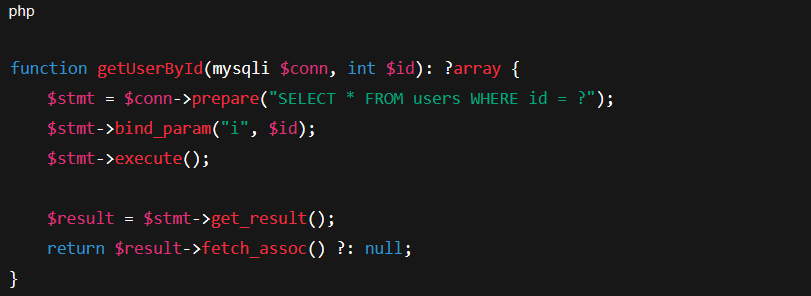
Codeium Example:
Code Without Codeium:

Codeium Generates:
Elementor AI – AI-powered WordPress site building
What it is:
Elementor AI is an AI layer integrated directly into the popular Elementor page builder for WordPress. It can generate page layouts, text, images, and design variations based on natural language prompts, and even transform existing sections into new designs.
In broader reviews of AI website builders, Elementor (alongside tools like Wix and 10Web) is consistently highlighted as a top AI-enhanced builder for WordPress.
Best for:
- WordPress sites (landing pages, blogs, marketing sites, small e-commerce)
- Developers who want faster layout and content scaffolding, then refine with custom PHP/JS
- Agencies that build many WP sites and want to save hours on first drafts
Real-world workflows
- Rapid MVP for a client site
- You’re building a small business site on WordPress.
- Using Elementor AI, you prompt: “Create a home page hero section for a travel consultant – include a bold headline, booking CTA, and 3 feature highlights.”
- Elementor generates a full hero section with placeholder content. You tweak copy, replace images, and — if needed — enhance with custom PHP hooks or JS.
- Combine with custom theme/plugin development
- Use Elementor AI to generate the public-facing pages quickly.
- Then, in your custom plugin or theme files, use Copilot/Codeium/Cursor to implement:
- Custom post types for tours
- REST routes for bookings
- Integration with payment gateways
- This hybrid approach keeps content & layout fast while giving you full power under the hood.
- Headless / hybrid setups
- Even if you’re using WordPress as a headless CMS (e.g. Laravel or Next.js frontend):
- Elementor AI can help your editorial team design nice preview pages and content blocks.
- You handle the JSON APIs and front-end rendering in Laravel/JS.
- Even if you’re using WordPress as a headless CMS (e.g. Laravel or Next.js frontend):
What about Joomla?
Joomla doesn’t yet have an Elementor-level, mainstream AI builder, but the coding assistants above (Copilot, ChatGPT, Cursor, Codeium) work very well for:
- Custom Joomla templates (HTML/PHP layout files)
- Module & plugin scaffolding
- Migrating Joomla extensions to modern PHP versions
And because Joomla uses standard PHP and MVC patterns, AI tools trained on PHP + frameworks can often produce good starting points.
How these tools map to your stacks
Here’s a quick “who to use where” view:
- HTML / CSS / vanilla JS
- GitHub Copilot / Codeium / Cursor for autocomplete & refactors
- ChatGPT for explaining browser quirks, performance, SEO, and layout bugs
- Core PHP websites
- Copilot / Codeium for form handling, DB queries, and legacy code clean-ups
- ChatGPT for refactoring to MVC or planning migration to Laravel
- Laravel
- Copilot & Codeium for Eloquent, controllers, tests
- Cursor for large refactors and new features across modules
- ChatGPT for tricky architecture questions (multi-tenant, queues, events)
- Python (Django / Flask / FastAPI)
- Copilot / Codeium / Cursor for everyday development
- ChatGPT for porting features between PHP and Python, plus deep explanations
- WordPress
- Elementor AI for front-end page building
- Copilot / Codeium / Cursor for theme/plugin development
- ChatGPT for hook references, debugging plugin conflicts, and security checks
- Joomla
- Copilot / Codeium / Cursor for component/module/plugin code
- ChatGPT for understanding old extensions and planning upgrades
Practical tips to get real value (not just “cool demos”)
- Pair tools instead of picking just one
Many teams use Copilot/Cursor + ChatGPT together: one for in-editor help, one for bigger discussions and design. - Use AI to review and explain code, not just generate it
- Ask: “Find security issues in this WordPress plugin file”
- Or: “Explain what this Joomla model does and where it’s used.”
- Lean on AI for testing & docs
- Generate PHPUnit/Pest tests for Laravel, or pytest tests for your Python API.
- Ask for docblock comments and README scaffolding for open-sourcing your package.
- Always do a human review
News about AI-assisted tools (like Cursor’s Bugbot) shows that even vendors are building AI to catch AI-introduced bugs — that’s how real the risk is.
Treat AI output as an intelligent intern, not an infallible senior dev.
Bring Your Next Big Software Application To Life
Building a powerful, scalable, and future-ready software application is no longer just about writing code — it’s about choosing the right tools, the right technology stack, and the right partners who understand your vision. With AI-driven development accelerating workflows and eliminating guesswork, 2026 offers more opportunities than ever to transform an idea into a fully functional product.
Whether you’re building a simple website, a complex SaaS platform, or a multi-stack ecosystem, the key is to combine innovation with solid engineering expertise. Get in touch with Developers Pub for more such tips.